What The Forecast
- 4.0
- Rating
- 5.00M
- Installs
- Free
- Price
 Analysis by App-foxy
I usually want a weather app to answer one question quickly: should I take a jacket, change my commute, or cancel an outdoor plan? What The Forecast takes that ordinary task and gives it a very different personality. It is a free weather app from Affiliated Apps LLC that mixes forecast information with deliberately obnoxious humor, so checking the sky can feel more like opening a sarcastic conversation than reading a neutral report.
That tone is the main reason to install it, and also the main reason some people will remove it after one use. The app is aimed at adults who enjoy blunt, irreverent language rather than a calm presentation. It carries a Mature 17+ rating, so I would not treat it as a family-friendly weather screen or hand it to a child simply because the basic function is familiar.
After spending time with it, my view is fairly simple: this is best used as a quick, personality-driven forecast companion, not as the only tool for serious weather decisions. It can make a routine check more memorable, but the humor should never replace careful attention to the actual conditions shown in the app.
You May Also Like

 Blood Strike: 2.5 Anniversary
Blood Strike’s Loadouts Turn Every Drop Into a Tactical Gamble
A close look at Blood Strike’s custom loadouts: how fast access to signature weapons reshapes its battle royale rhythm, rewards preparation, and narrows the gap between fights.

 Pandora - Music & Podcasts
Pandora’s Music Is Easy to Start, but Harder to Recover
Pandora’s strength is its low-effort path from a seed to a station. Its weak spot is how much confidence it asks you to place in connection, setup, and quiet recovery.

 8 Ball Pool
 Is Built on Rivalries, Rematches, and Routine
A close look at the rivalries, rematches, shared routines, and unanswered safety questions that turn a quick pool match into a persistent mobile community.

 Samsung Music
’s Quiet Strength Is Playing What You Already Own
Its reach comes less from spectacle than from dependable access to a personal library. That simplicity is both the app’s strongest retention engine and its ceiling.

 AccuWeather: Weather Radar
AccuWeather Review: A Quick, Clear Forecast for Everyday Decisions
For everyday plans, the best forecast is the one you can understand quickly. AccuWeather makes rain timing, radar, and local conditions easy to act on, with a few trade-offs.

 Hill Climb Racing
Why Hill Climb Racing Still Turns Crashes Into One More Run
A tiny car, a bumpy hill and one more upgrade: Hill Climb Racing keeps resurfacing because its simple chaos makes every near-miss feel personal.
More From Our News Desk
View All News


How I use it for an ordinary weather check
My baseline workflow is intentionally short. I open the app, look at the current conditions and the forecast period I care about, then decide what to do. For a morning commute, that means checking whether rain or uncomfortable temperatures could affect walking, cycling, or waiting for transit. For an evening plan, I look farther ahead rather than relying only on the current screen.
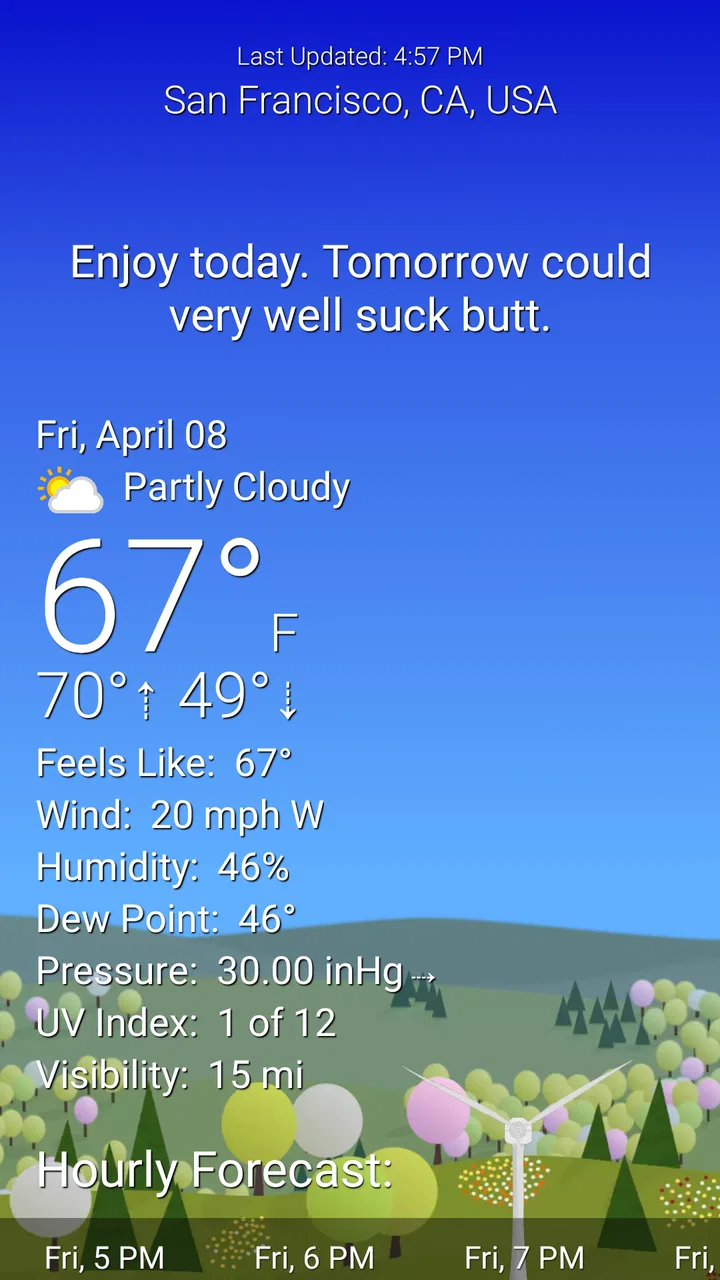
The personality appears immediately in the way the forecast is presented. Instead of sounding like a broadcast or a formal meteorological bulletin, the app uses an attitude that can be funny, rude, or excessive depending on your taste. That makes the information easier to remember for me, but it also means I need to separate the entertaining wording from the practical decision underneath it.
A useful habit is to read the forecast twice: first for the joke, then for the actual weather details. The first pass gives the app its charm; the second keeps me from treating a dramatic phrase as a precise warning. This is especially important when I am deciding whether a short trip is merely unpleasant or genuinely unsafe. The app’s voice is entertainment layered over weather information, not a substitute for judgment.
For a realistic everyday example, imagine leaving for work on a morning when the sky looks clear. I might open the app while making coffee, check the near-term outlook, and notice that the presentation is warning me about a change later in the day. Rather than letting the joke become the whole takeaway, I use that prompt to decide whether to pack rain protection before leaving. On the way home, I can check again instead of assuming the morning view still applies.
This repeatable routine is where the app works best: open, scan, verify the relevant time period, and act. It does not need to become a long session. If I find myself reading every line only for the comedy, I am no longer using it efficiently as a weather tool.
The right audience for the tone
The app suits adults who are bored by interchangeable weather interfaces and want a little character in a task they perform every day. If you enjoy sarcastic commentary and do not mind strong language, the unusual presentation can make you more likely to remember to check the forecast. That is a real practical benefit: an app you actually open can be more useful than a polished one you ignore.
On the other hand, I would skip it if you want a quiet, professional display for a shared household tablet, a workplace screen, or a child’s device. The Mature 17+ rating is not a minor footnote here; it matches the app’s central style. Even if the forecast itself is useful, the wording may be awkward in public or around people who did not choose that kind of humor.
I would also hesitate to recommend it as the sole weather reference for outdoor work, travel planning, or situations where precise interpretation matters more than entertainment. A conventional weather service is usually the better companion when you need a restrained presentation and a straightforward way to compare conditions without personality getting in the way.
Settings and habits worth checking
The most useful settings work is not about turning the app into something it is not. It is about making the experience fit your tolerance for its voice and your normal checking routine. I would begin by reviewing the available presentation and notification choices rather than accepting every default. A weather app can become irritating when it interrupts too often, especially if the humor is more noticeable than the information.
My advice is to keep alerts focused on situations that change a decision. If a notification merely repeats something I can see by looking outside, it adds noise. If it helps me remember to check before commuting or leaving for an outdoor appointment, it earns its place. The exact balance depends on how often your plans change and how much interruption you tolerate.
Location handling also deserves a practical check. I prefer to confirm that the app is showing the place I actually care about before trusting a forecast for a trip across town or a weekend away. A familiar home location can remain selected even when my plans have changed. The simple habit of checking the location label before interpreting the forecast prevents a surprisingly common mistake.
For regular use, I would arrange my phone so the app is easy to reach at the times I normally need it. A shortcut on the first screen is more valuable than a complicated system of reminders if my goal is a ten-second check. The app’s humor makes it memorable, but convenience is what turns that novelty into a repeatable habit.
Because the app is free, trying different settings does not require a purchase decision up front. There are in-app purchases ranging from $1.99 to $19.99 per item, so I would treat optional paid elements as a separate choice rather than assuming they are necessary for the basic weather-checking routine. I would first use the free experience long enough to decide whether the tone and workflow genuinely fit me.
Faster patterns for busy days
My fastest pattern is a three-step scan: current conditions, the period when I will be outside, and the trend that could affect my return. That is more useful than staring at the entire forecast whenever I only need to decide what to wear. It also keeps the app’s jokes from turning a simple decision into a long reading session.
A second pattern is to check at transition points rather than randomly. I look before leaving home, before starting an outdoor activity, and before heading back if the day is changeable. This creates a small rhythm that works better than checking constantly. The app becomes a practical checkpoint instead of a source of repeated distraction.
For a planned event, I would check early enough to change the plan, not only minutes before it begins. If an outdoor meal or walk looks questionable, an earlier look gives me time to move indoors, carry suitable clothing, or warn other people. The app’s comic voice can make the warning memorable, but the useful part is acting while alternatives still exist.
Another helpful trade-off is using this app for awareness and a more conventional source for confirmation when the decision has real consequences. I might use What The Forecast for a quick morning impression, then consult a calmer weather service before a long drive or demanding outdoor activity. That combination preserves the app’s convenience without asking it to perform a job better suited to a specialist tool.
Experienced use also means learning when not to open it. If I am already outside and conditions are visibly deteriorating, I do not need a witty explanation before finding shelter. If I am making a high-stakes decision, I want the clearest information available, not the most entertaining presentation. The best shortcut is recognizing when the app is appropriate and when it is not.
Where the personality helps and where it gets in the way
The strongest part of the design is memorability. Most weather apps blur together: icons, temperatures, precipitation symbols, and a familiar hourly layout. This one has a distinct voice, and that gives routine information an emotional hook. I am more likely to remember that I saw a warning earlier because the wording made me react to it.
That same voice can reduce clarity. Sarcasm is subjective, and a line that makes me laugh may annoy someone else or feel too dramatic for the conditions. If several people share a device or rely on a common household forecast, the app’s personality becomes a social consideration rather than a private preference.
There is also a risk of confusing tone with accuracy. Strong language can make ordinary weather sound extreme, while a funny line may encourage me to focus on the punchline instead of the timing or severity of the conditions. I recommend treating the written attitude as a reminder to inspect the forecast details, not as a measurement in itself.
Compared with standard weather apps, this one wins on character and loses on neutrality. A typical alternative is better when I want a quiet glance at information, a presentation suitable for all ages, or a tool that feels interchangeable with a professional dashboard. What The Forecast is better when the act of checking the weather has become boring and I want something that gives it a recognizable voice.
Technical expectations and practical limits
The app is available at no cost and supports devices running Android 8.0 or later. Its current version is 3.95.4.578, which tells me that it is an established product rather than a brand-new experiment. Still, a version number alone does not guarantee that every device will feel identical, so I would pay attention to how comfortably it runs on an older phone before making it my everyday weather tool.
Its reach is substantial, with over five million installs, and it has an average rating of 4.0 from around fourteen thousand ratings. Those figures suggest that the unusual concept has found a real audience, but they do not remove the personal nature of the experience. A broad audience can validate that the app works for many people without meaning that its humor will suit me.
The developer, Affiliated Apps LLC, has built the identity around the contrast between a familiar utility and an obnoxious attitude. That is a clear design decision, not a small decorative feature. If I dislike the tone, there is no separate weather function that completely escapes it; the personality is part of what I am installing.
I would be careful about relying on it during severe or rapidly changing conditions. The sensible approach is to use official local warnings and established emergency guidance when safety is involved. A humorous weather interface can be a convenient first glance, but it should not be the final authority for decisions involving dangerous travel, outdoor exposure, or emergency preparation.
Storage and attention are also part of the trade-off. A weather app does not need to occupy much of my day, and I would remove notifications that do not change my behavior. If the app starts feeling like a source of commentary rather than a useful check, I would simplify the routine or switch to a quieter alternative instead of forcing myself to enjoy the joke.
Who should install it, and who should choose something else
I would recommend it to an adult who wants a free weather app with a strong sense of humor, checks conditions several times a day, and understands that entertainment and precision are not the same thing. It is especially appealing if ordinary forecast screens fail to hold your attention and you want a reason to build a regular checking habit.
I would point a family toward a more neutral option, particularly when children may see the screen. I would also choose a conventional service for someone who needs a restrained interface for work, detailed planning, or formal communication. People who dislike profanity, sarcasm, or exaggerated phrasing should skip this one; the central appeal will feel like constant friction rather than a bonus.
For travelers, I see it as a secondary tool. It can provide a quick sense of what the day may feel like, but unfamiliar locations make it even more important to verify the selected place and consult dependable local information before committing to a long journey. The app is most comfortable in the role of a fast companion, not a complete travel-weather strategy.
My final routine after using it
After testing the app as part of a normal day, I would keep the workflow deliberately disciplined: use it for quick checks, review the relevant time window, avoid unnecessary interruptions, and confirm important decisions through a neutral or official source. That approach lets the personality add value without allowing it to dominate the decision.
The best reason to use What The Forecast is that it makes you remember to check the weather. The best reason not to use it is equally clear: if you want weather information without attitude, the attitude is not removable background decoration. It is the product’s identity.
My verdict is positive but specific. This is a distinctive free weather app for adults who enjoy irreverent commentary and want a more memorable daily forecast ritual. It is not my first choice for children, shared spaces, formal planning, or safety-critical decisions. If you understand that trade-off, the app can turn a dull glance at the sky into a quick, repeatable habit with personality. If you do not, a calmer alternative will serve you better.
FAQs for What The Forecast
01What is What The Forecast?
What The Forecast is a weather app that presents current conditions and upcoming forecasts with a deliberately humorous, sarcastic style. Along with practical information such as temperature, precipitation, wind, humidity, and forecast details, it adds entertaining commentary that makes checking the weather feel less routine. It is designed for users who want useful weather data without the overly serious presentation found in many standard weather apps.
02What weather information does What The Forecast provide?
The app generally provides the essential information needed for everyday planning, including current temperature, feels-like temperature, weather conditions, precipitation chances, wind details, humidity, and forecast information for the coming hours or days. Depending on the device, location settings, and available weather data, some features may vary. Users should also remember that forecasts are estimates and can change as conditions develop.
03Does What The Forecast use my location?
What The Forecast can use your device’s location to identify nearby weather conditions and automatically display a forecast for your current area. You may be asked to grant location permission when setting up the app. If you prefer not to share your location, you can usually search for and save a city manually, although location-based updates may be less convenient. Check the permission settings on your Android or iOS device if needed.
04Is What The Forecast free to download and use?
What The Forecast may be available as a free download, but the exact experience can depend on the platform version and the app’s current business model. Free versions may include advertising, optional purchases, or limitations on certain customization features. Before downloading, it is worth checking the Google Play Store or Apple App Store listing for the latest pricing, subscription details, supported devices, and any differences between the free and paid experience.
05Is What The Forecast suitable for children or professional weather use?
The app is primarily intended for entertainment-minded users who enjoy sarcastic or occasionally edgy commentary alongside their weather information. Some wording may not be appropriate for young children or users who prefer completely family-friendly language. It can be useful for casual daily planning, but it should not replace official weather alerts, emergency services, or professional meteorological sources when making safety-critical decisions about storms, travel, or outdoor activities.
Pros
- Humorous forecast descriptions make checking the weather more entertaining.
- Supports multiple locations for tracking weather in different places.
- Provides current conditions along with upcoming forecast information.
- Useful weather details include temperature
- wind
- and precipitation chances.
- Clean interface makes essential forecast data easy to find.
Cons
- Frequent jokes may not appeal to users seeking a strictly professional forecast.
- Some advanced weather tools may require a paid version or subscription.
- Forecast accuracy can vary depending on location and local data coverage.
- Notifications may become distracting if alerts are enabled too often.
- The app’s personality-focused design may feel less suitable for quick business use.

What The Forecast
Gallery